“Acorn Econet, the Series”
In this series, I will document my newly gained experience with Acorn Econet and PiEconetBridge. Some time ago, I obtained a BBC Micro with Econet fitted. A network with only one device is no fun - so obviously, I need more Econet devices!
Back in the day, 40-odd years ago, I never had the chance to use Econet - so it’s safe to say I have zero experience with all this stuff. I’m learning from other Acorn enthousiasts (thanks, people at StarDot and BigBenClub NL!).
So here’s Episode 1: Econet introduction. In Episode 2, I will dive a bit deeper into the technical side.
Econet introduction
Acorn Econet is an early (1980) implementation of a Local Area Network. A LAN typically connects microcomputers in the same building, allowing them to exchange data and share peripherals. In Econet parlance, computers on the LAN are called “Stations”, each with their own “Station ID” number.
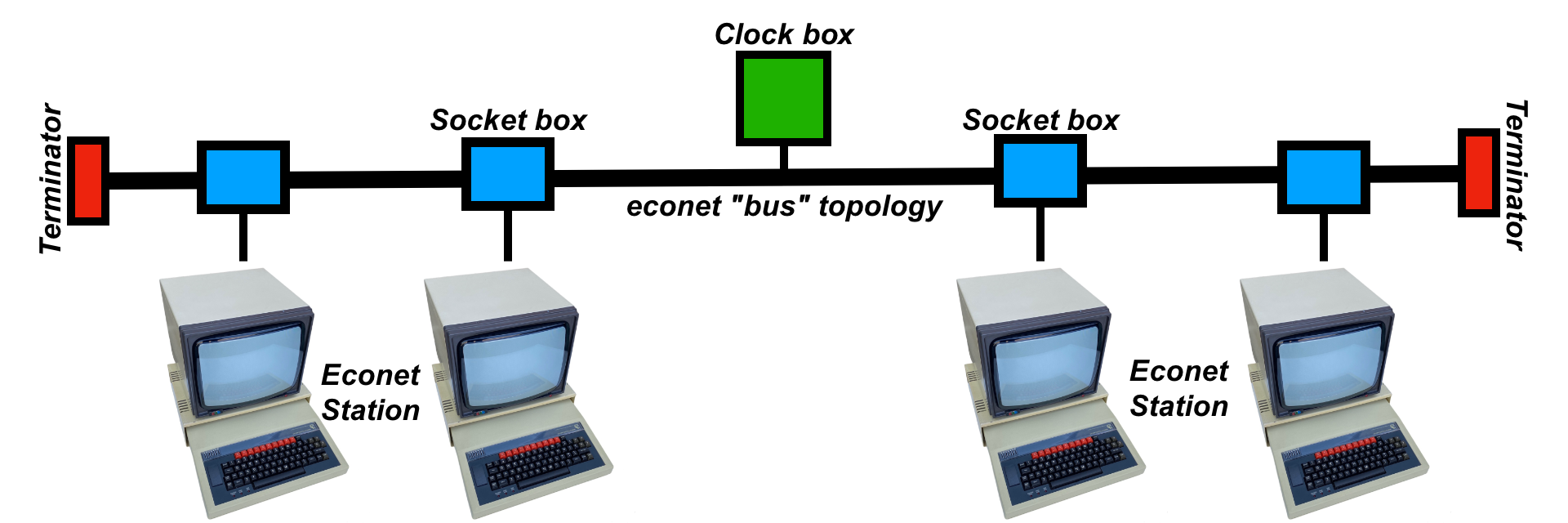
Peripherals like floppy drives and printers were quite expensive, so Econet was an affordable way to share disk storage and a printer in a classroom or business.
Capabilities were quite impressive:
- Up to 255 stations per Econet
- Multiple Econets can be joined together using a Gateway
File server
File servers provide shared disk storage. There are several “levels” of File server. Again, quoting Chris’s Acorns:
-
Acorn Level 1 File server (1983)
- The Level 1 File server software runs on a BBC Model B or Master 128 with up to 4 disc drives and an Econet interface
- Each station is given a letter to identify its files - known as the ‘directory letter’
- There is no user management; files are organized by workstation using the directory letters
- You log in using the Station ID: “
*I AM 123”
-
Acorn Level 2 File server (1985)
- The Level 2 File server software (AES21) runs on a Master Turbo, Master 128 or BBC Model B with 6502 second processor, dual 800K floppy disc drive and Econet interface.
- It introduces usernames (and passwords) as well as the SYST user
- You log in using your User ID: “
*I AM SHEILA”, optionally with a password
-
Acorn Level 3 File server (1986)
- The Level 3 File server software runs on a Master Turbo, Master 128 or BBC Model B with 6502 second processor, 10 MB or 30MB hard disc, dual 800K floppy disc drive and Econet interface
- This is mostly an improved version of a Level 2 File server
-
Acorn Level 4 File server (1989)
- The Acorn Level 4 File server was designed to run on an Archimedes Computer with an ARM2 CPU running RISC OS 2
- It did not see widespread adoption
There are two types of file: your own files, and “Library” files that can be run by anyone. There are specific directories where Library files are expected to be. More on that in a future episode.
Printer server
Printer servers allow a printer to be shared between multiple Econet stations. Normally, a print server is a BBC Model B with the AES22 Print Server EPROM and is dedicated to printing. The printer server can double as an Econet station because printing is mostly handled in the background.
Manuals
Econet User Guide
- Acorn Econet Level 1 File server User Guide
- Acorn Econet Level 2 File server User Guide
- Acorn Econet Level 2/3 File server User Guide
Econet File Server Manager Guide
- Acorn Econet Level 1 File server Manager’s Guide
- Acorn Econet Level 2 File server Manager’s Guide
- Acorn Econet Level 3 File server Manager’s Guide
Econet Print Server Manager Guide
Resources
- https://chrisacorns.computinghistory.org.uk/Network/Econet.html
- https://theoddys.com/acorn/acorn_system_filing_systems/econet/acorn_econet.html
- https://en.wikipedia.org/wiki/Econet
- https://www.beebmaster.co.uk/Econet/IWantanEconet.html
- https://www.retro-kit.co.uk/page.cfm/content/Acorn-Econet/
- https://stardot.org.uk/forums/viewtopic.php?t=26839
- https://stardot.org.uk/mirrors/www.bbcdocs.com/
Series episodes
-
Acorn Econet episode 2: technical background (2026-02-14)
-
Acorn Econet episode 1: introduction (2026-02-07)